

A good Core Web Vitals score means your site passes all three of Google’s performance thresholds: an LCP (Largest Contentful Paint) of 2.5 seconds or under, an INP (Interaction to Next Paint) of 200 milliseconds or under, and a CLS (Cumulative Layout Shift) of 0.1 or under. Hitting those numbers puts your pages in the “Good” category in Google Search Console, which is the clearest signal that real visitors are having a fast, stable experience. Getting there typically requires a combination of image optimization, reducing unnecessary code, and choosing a hosting environment fast enough to serve your pages quickly.
What the three Core Web Vitals actually measure
Google uses three specific measurements to judge page experience, and each one targets a different thing a visitor actually feels. Understanding what they measure makes it easier to know what to fix.
- LCP (Largest Contentful Paint) measures how long it takes for the biggest visible element on the page — usually a hero image or a large headline — to fully load. Under 2.5 seconds is Good. 2.5–4.0 seconds needs improvement. Over 4.0 seconds is Poor.
- INP (Interaction to Next Paint) replaced the older FID metric in 2024. It measures how quickly the page responds after a visitor clicks a button, taps a menu, or fills out a form. Under 200 milliseconds is Good. 200–500 ms needs improvement. Over 500 ms is Poor.
- CLS (Cumulative Layout Shift) measures visual stability — specifically whether elements jump around as the page loads. That annoying moment when you go to click something and it moves? That’s CLS. A score of 0.1 or under is Good.
These thresholds come directly from Google’s public documentation and are assessed based on real visitor data collected through the Chrome browser, not just a lab test. That distinction matters: your score reflects what actual users on real devices experience, not a simulation.
Why a good Core Web Vitals score matters for your business
Core Web Vitals are a confirmed Google ranking signal, which means poor scores can hold back pages that are otherwise well-optimized. That said, they are one factor among many — a site with weak content and few backlinks will not suddenly rank on page one just because it loads fast. Be skeptical of anyone who promises otherwise.
Where the real business case sits is in user behavior. A page that loads slowly, shifts around, or freezes when someone taps a button costs you visitors before you ever get a chance to convert them. Improving your Vitals is fundamentally about making the experience of using your site less frustrating, and that tends to show up in lower bounce rates and higher form completion over time.
If your site primarily serves mobile users — which describes most small business sites today — the stakes are higher. Mobile connections are slower and devices are less powerful, so the gap between a well-optimized site and a sluggish one is much more noticeable on a phone than on a desktop computer.
This is the kind of thing we handle day to day — you can see how our build process works or browse recent work.
The most common reasons business websites fail Core Web Vitals
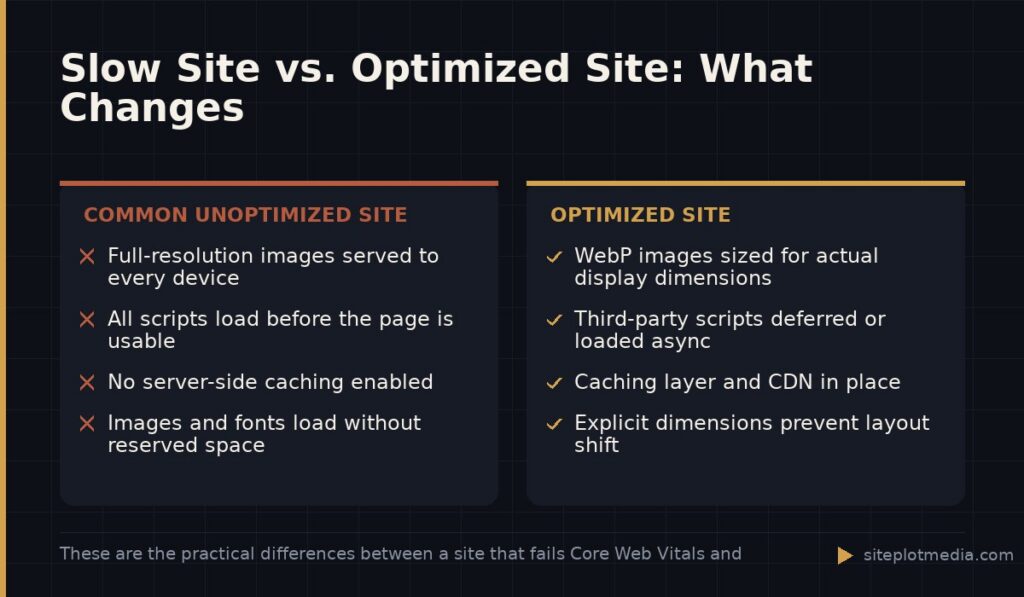
Most small and mid-sized business sites fail on LCP first, and the reason is almost always images. A hero photo that is served at full resolution, without modern compression or the right file format, can easily add two or three seconds to your load time on its own. Switching to WebP format and properly sizing images for the display dimensions they actually appear at addresses this without touching a line of code on most platforms.
The second most common culprit is too much JavaScript loading before the page is usable. Page builders like Elementor or Divi — popular because they make design flexible without coding — load a meaningful amount of CSS and JavaScript even on simple pages. That overhead adds up, especially when combined with chat widgets, marketing pixels, and third-party review plugins all loading at once. None of those tools are inherently bad, but they require deliberate management.
CLS failures often trace back to fonts or images that load without reserved space. When the browser does not know how big an element will be before it loads, it pushes content around to make room — that is layout shift. Setting explicit dimensions on images and using font-display settings that prevent invisible text from snapping into place are the two most common fixes.
Hosting is the foundation under all of it. Shared hosting plans that made sense a decade ago often cannot serve pages fast enough to hit modern thresholds, especially if your site is running WordPress with a full plugin stack. Upgrading to a managed WordPress host or a server with a proper caching layer is often the highest-leverage single change a site owner can make.
How to check your current scores before spending anything
Start with Google Search Console if you already have it connected to your site. The Core Web Vitals report under “Experience” shows your real-world (field data) scores grouped by Good, Needs Improvement, and Poor, broken out by mobile and desktop. This is the data Google actually uses, so it is the number that matters most.
For a quick look at any URL without needing an account, PageSpeed Insights (pagespeed.web.dev) gives you both a lab score and field data in about thirty seconds. The lab score — the number out of 100 — is useful for spotting issues, but do not treat it as the definitive measure. A site can score 72 in the lab and still pass all three field data thresholds, or score 90 in the lab while failing INP on real devices. Look at both, but trust the field data more.
If your site is new or low-traffic, Google may not have enough real visitor data to show field scores yet. In that case, focus on the lab diagnostics: PageSpeed Insights will list specific opportunities and their estimated impact, which gives you a reasonable starting point.
A practical path to passing scores
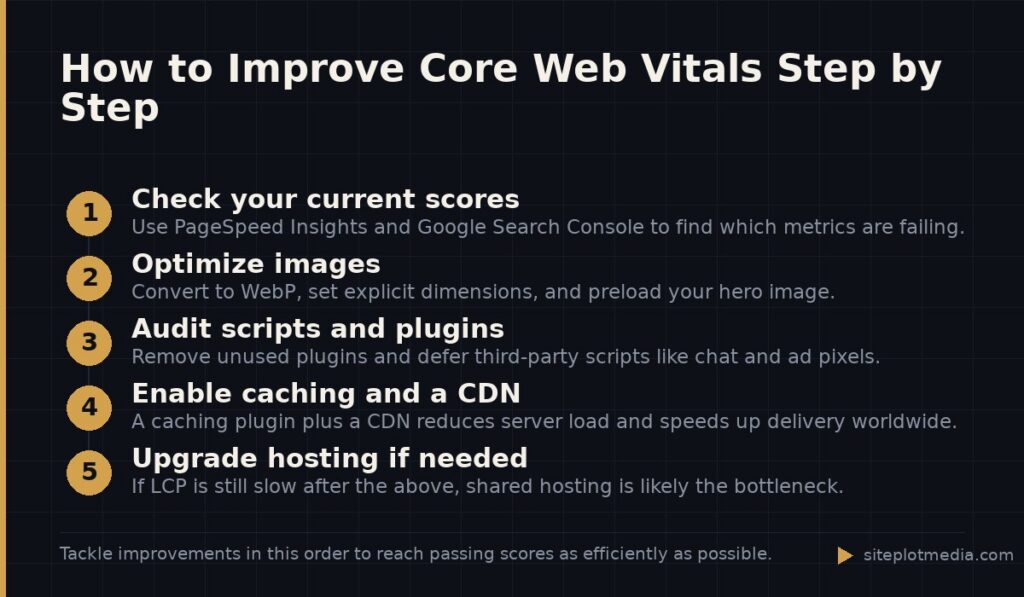
The order in which you tackle improvements matters. Fixing the highest-impact items first gets you to passing thresholds faster and avoids spending effort on issues that account for a fraction of the problem.
- Optimize and compress images first. Convert to WebP, set explicit width and height attributes, and lazy-load images below the fold. Add a preload hint for the single hero image at the top of the page so the browser fetches it immediately.
- Audit your plugins and third-party scripts. Remove anything you are not actively using. For the scripts you must keep — analytics, chat, ad pixels — load them asynchronously or defer them so they do not block the page from becoming usable.
- Enable server-side caching. On WordPress, a caching plugin like WP Rocket or LiteSpeed Cache paired with a CDN (content delivery network) dramatically reduces how much work the server has to do for each visitor.
- Upgrade hosting if needed. If you have done the above and LCP is still above 2.5 seconds, the server itself is likely the bottleneck. Managed WordPress hosts like Kinsta, WP Engine, or Cloudways typically outperform generic shared plans significantly.
- Fix layout shift. Set width and height on every image in your HTML, reserve space for ads and embeds, and check your font loading strategy.
For many small business sites, the image and caching steps alone are enough to move from Poor or Needs Improvement into the Good range. A full rebuild is not always necessary — be cautious of any vendor who leads with that recommendation before auditing your specific issues.
When a site is built on an outdated theme, uses a heavy page builder on every page, or is carrying years of accumulated plugins, a rebuild designed around performance from the ground up can be the more economical long-term choice. Siteplot Media’s website builds are structured with performance as a core deliverable, starting at $5,000 one-time with a 90-day included support period — but whether that makes sense depends entirely on how far your current site is from the goal and what it would cost to get it there through optimization alone.
Frequently asked questions
What is a passing Core Web Vitals score?
A passing score means your site hits Good thresholds on all three metrics: LCP at or under 2.5 seconds, INP at or under 200 milliseconds, and CLS at or under 0.1. Google Search Console will show your pages as "Good" when real visitor data confirms all three are met.
Does a good Core Web Vitals score guarantee better Google rankings?
No — Core Web Vitals are one confirmed ranking signal, but content relevance, backlinks, and overall site authority carry more weight. Passing scores remove a potential penalty and improve user experience, but they will not overcome weak content or a low-authority domain on their own.
How long does it take to improve Core Web Vitals?
Technical fixes like image optimization and caching can be implemented in days, but Google's field data scores update on a rolling 28-day window, so you will not see the results reflected in Search Console immediately. Allow four to six weeks after making changes before evaluating the outcome.
My PageSpeed Insights score is high but Search Console still shows Poor — why?
PageSpeed Insights lab scores simulate a single visit under controlled conditions, while Search Console uses real data from actual visitors on their own devices and connections. INP in particular rarely shows up in lab tests but can fail in the field if your JavaScript responds slowly to real user interactions.
Do Core Web Vitals affect mobile and desktop separately?
Yes — Google assesses mobile and desktop performance independently, and most sites perform worse on mobile. Because Google primarily uses the mobile version of your site for ranking (called mobile-first indexing), your mobile Core Web Vitals scores are the more important ones to prioritize.