To migrate from Elementor to a custom WordPress theme, you export your content, rebuild your pages in clean HTML/CSS (or a lightweight theme framework), and reconnect your data — menus, forms, images, and SEO settings — before switching the active theme. The process takes anywhere from a few days to several weeks depending on how many pages you have and how complex your current design is. Done correctly, you end up with a faster, more maintainable site; done carelessly, you can lose rankings, break layouts, and frustrate visitors.
Why business owners consider leaving Elementor in the first place
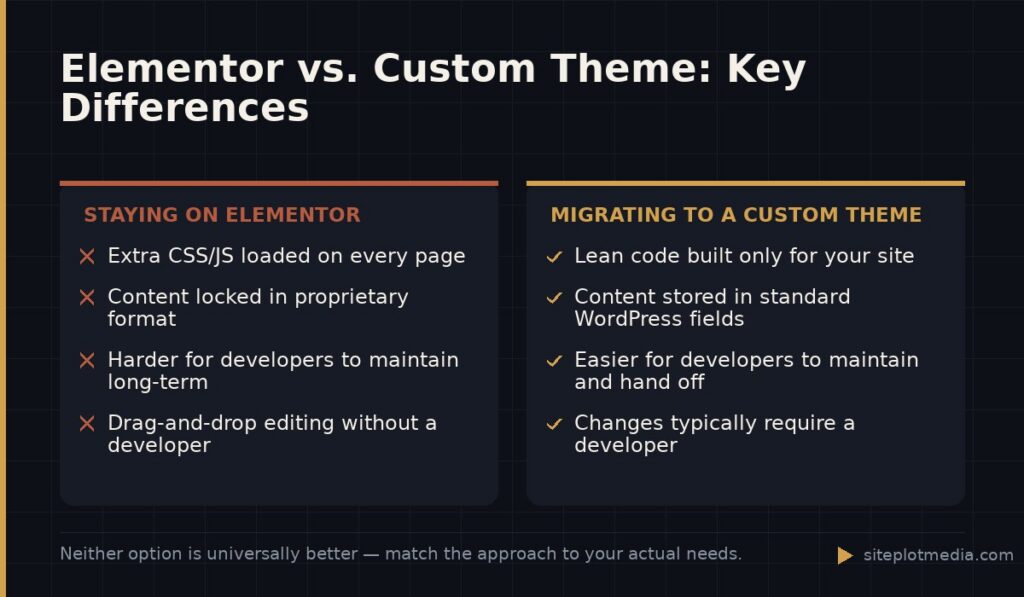
Elementor is a legitimate tool, and for many small sites it does the job well. But after a few years of use, certain problems tend to surface. Pages get slower because Elementor loads its own CSS and JavaScript on every page, whether or not that page uses every feature. The code it generates is also deeply nested and hard for developers to maintain or hand off to someone new.
The other issue is structural lock-in. Your content — headings, copy, images — is stored inside Elementor’s own data format inside the WordPress database. If you ever need to switch themes or hire a different developer, you often have to rebuild from scratch anyway. Knowing that, some business owners decide it’s better to build on a clean foundation now rather than later.
That said, if your site is performing well, loading fast, and your developer can work in Elementor comfortably, switching may not be worth the disruption. Be honest with yourself about whether the problem is the tool or something else, like outdated content or a slow host.
What "custom theme" actually means (and what it doesn't)
A custom WordPress theme is a set of template files — PHP, CSS, and JavaScript — that control how your site looks and functions without relying on a visual page builder. Your content still lives in WordPress. The theme just controls the presentation layer. Developers can write these from scratch, or start from a minimal “starter theme” that provides the structure without imposing a design.
Custom does not automatically mean better-looking. It means the code is purpose-built for your site, so there’s no unused feature weight dragging down performance. It also means changes require a developer rather than a drag-and-drop interface, which is a real trade-off you should factor into your decision.
A middle path — which some developers recommend — is using a very lightweight builder like Kadence Blocks or plain WordPress block editor (Gutenberg) with a well-coded theme. That approach gives you some flexibility without the full overhead of Elementor. It’s worth asking your developer whether a full custom build is truly necessary for your goals.
This is the kind of thing we handle day to day — you can see how our build process works or browse recent work.
The actual migration process, step by step
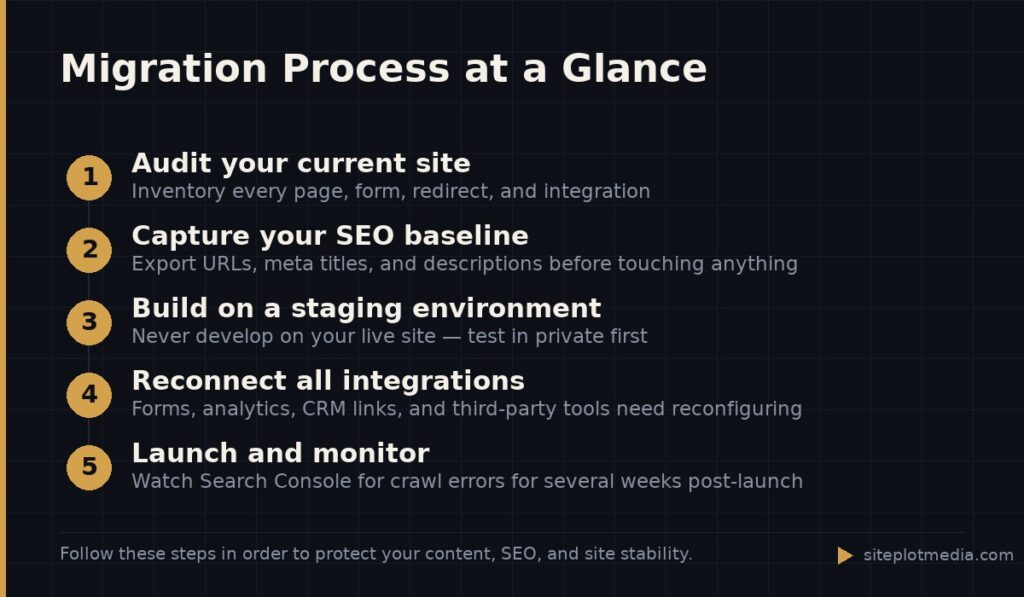
Every migration is different, but the core sequence looks like this:
- Audit your current site. List every page, post type, form, redirect, and third-party integration. You cannot protect what you haven’t inventoried.
- Capture your SEO baseline. Export your existing meta titles, meta descriptions, and URL structure using a plugin like Yoast or Rank Math. Your URLs should stay the same after migration — changing them breaks inbound links and can hurt rankings.
- Build and test the new theme on a staging environment. Never build on your live site. A staging environment is a private copy of your site where changes don’t affect real visitors.
- Migrate content carefully. Text and images can often be copied manually or exported via tools. Elementor widget content sometimes needs to be re-entered because it’s stored in a proprietary format, not standard WordPress fields.
- Reconnect everything. Forms, analytics tracking codes, chat widgets, e-commerce integrations — these all need to be reconfigured in the new theme.
- Run a pre-launch checklist. Broken links, missing images, form submissions, mobile layout, page speed scores, and 301 redirects for any URLs that did change.
- Switch the live theme and monitor. Watch traffic and crawl errors in Google Search Console for several weeks after launch.
The step that surprises most clients is the content re-entry. Because Elementor stores layout and content together in its own data structure, you often can’t just flip a switch and have clean content appear in a new theme. Plan for that time cost.
What can go wrong — and how to prevent it
The most common mistake is treating this like a visual redesign instead of a technical migration. Developers who focus only on how it looks and forget about URL structure, canonical tags, schema markup, and redirect chains can accidentally erase months of SEO progress.
Another frequent problem is losing form data or breaking integrations. If your contact form connects to a CRM or email platform, those connections are often configured at the theme or plugin level and need to be re-established explicitly.
Finally, watch out for a rushed launch. A new theme that hasn’t been tested on real mobile devices, across browsers, and at realistic connection speeds will have problems. Budget time for QA (quality assurance testing) — ideally a full week of testing before you go live.
How much does a migration like this cost?
Cost depends heavily on the scope: how many pages, how complex the design, how many integrations you have, and how much content needs to be rebuilt manually. A simple brochure site with five to ten pages might be handled by a freelancer for a few thousand dollars. A complex site with e-commerce, custom post types, and multiple integrations can run significantly higher.
For context, Siteplot Media’s custom WordPress builds start at $5,000 one-time, which includes a 90-day support period, then $500 per month after that for ongoing maintenance and updates. That’s not the cheapest option on the market, and it’s not meant to be — it’s priced for business owners who want the migration done once, correctly, with someone accountable on the other side.
If your site is small and your current Elementor setup is working reasonably well, a full custom build may genuinely not be necessary. A performance-focused Elementor cleanup or a switch to a lighter block-based theme might solve your problems for far less money. Ask whoever is quoting you to explain specifically what problems they’re solving — not just what they’re building.
How to know if you're ready to make the move
A migration makes the most sense when at least one of these is true: your site has measurable performance problems that are tied to Elementor’s code weight; your developer team is struggling to maintain or extend the current theme; you’re planning a significant redesign anyway and want to build it right this time; or your business has grown to the point where you need custom functionality that Elementor can’t support cleanly.
It makes less sense when your site loads quickly, your team is comfortable with the current setup, and the real issue is cosmetic. Rebuilding for the sake of rebuilding rarely produces a meaningful return.
The clearest signal you’re ready: when the cost of maintaining and working around your current setup exceeds the cost of starting fresh. That calculation is different for every business, but it’s the honest question to ask before you commit to a migration.
Frequently asked questions
Will migrating from Elementor to a custom theme hurt my Google rankings?
It doesn't have to, but it can if the migration is handled carelessly. Keep your URLs the same, preserve your meta titles and descriptions, set up 301 redirects for any URLs that do change, and monitor Google Search Console after launch — those steps protect your existing rankings.
Can I keep my existing content when I switch away from Elementor?
Text and images can usually be preserved, but Elementor stores layout and content together in its own format, so some content may need to be re-entered manually in the new theme. Your developer should audit this during the planning phase so you're not surprised by the workload.
How long does an Elementor to custom theme migration take?
A simple site with fewer than ten pages can realistically be migrated in two to four weeks, including design, build, and testing. Larger or more complex sites — especially those with e-commerce or custom integrations — typically take six to twelve weeks.
Do I need to rebuild my entire site design from scratch?
Not necessarily — a developer can replicate your existing visual design in a custom theme, so the site looks the same to visitors while the underlying code is completely rebuilt. Whether you redesign at the same time is a separate decision from the technical migration.
Is a custom WordPress theme always better than Elementor?
No — for small brochure sites with limited ongoing development needs, a well-maintained Elementor setup can be perfectly adequate. A custom theme makes the most sense when you have performance problems, complex functionality needs, or a developer team that finds Elementor difficult to maintain.