A tax preparer website should include a clear statement of services, a visible way to book or contact you, trust signals like credentials and reviews, and a fast mobile experience — because most people searching for a tax pro will do it on their phone. Beyond those basics, the right extras depend on whether you serve individuals, businesses, or both, and how much of your growth comes from organic search versus referrals.
Start with the pages every tax site needs
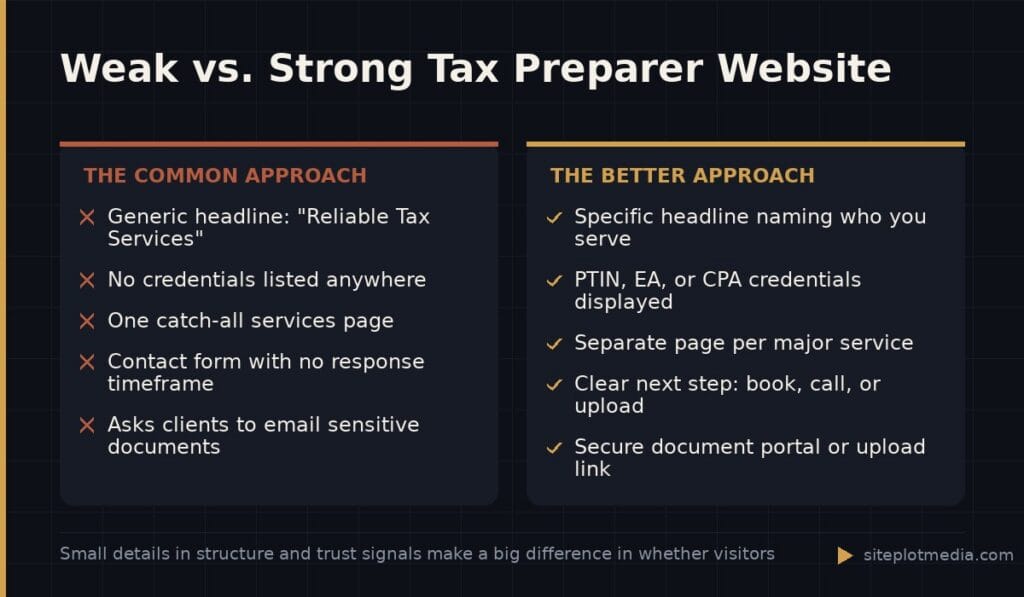
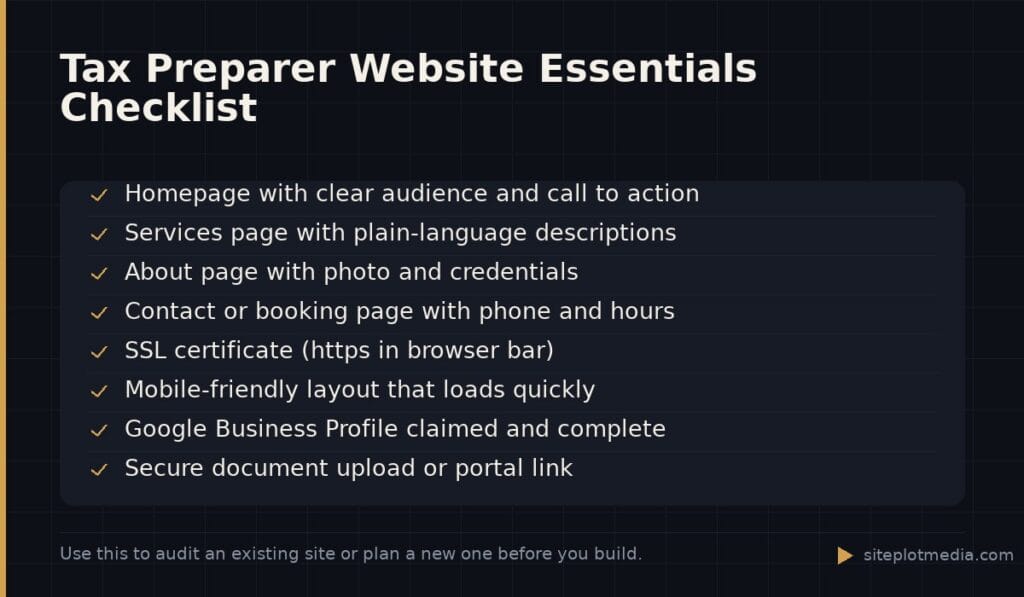
Most tax preparer websites underperform not because they lack features, but because they skip the fundamentals. Before anything else, you need a homepage that immediately tells a visitor who you serve, what you do, and what to do next. That means a headline that speaks to a specific audience (“Tax prep for freelancers and self-employed professionals” is clearer than “Reliable Tax Services”), a short summary of your main offerings, and a call to action — book a consultation, call now, or start a secure document upload.
Beyond the homepage, plan for these core pages at minimum:
- Services page — List each service (individual returns, small business filing, bookkeeping, ITIN services, etc.) with a short plain-language description. Do not just list form numbers; explain what the service is for.
- About page — Your credentials, years of experience, any specializations, and — if you are comfortable — a photo. People are handing you sensitive financial information; they want to know who you are.
- Contact or Book page — A form, a phone number, and your hours. If you use scheduling software, embed it here.
- Pricing or “How It Works” page — You do not have to list exact prices, but explaining your process or giving ranges reduces friction and weeds out poor-fit inquiries.
A blog or resources section is optional at the start, but it becomes valuable once you have time to maintain it consistently. Thin, outdated content does more harm than no content at all.
Trust signals are not optional in the tax industry
A prospective client searching for a tax preparer is evaluating risk. They are asking: “Is this person legitimate, and can I trust them with my Social Security number and financial records?” Your website needs to answer that question before they even read your services page.
The most effective trust signals are specific rather than vague. “Over 15 years of experience” is more believable than “experienced professional.” Listing your IRS Preparer Tax Identification Number (PTIN), your EA or CPA credentials, or your AFSP (Annual Filing Season Program) participation tells a knowledgeable visitor exactly what they need to know. If you are not credentialed, be straightforward about your registration status — people appreciate honesty.
Google reviews and verified third-party testimonials (from Google Business Profile, Yelp, or a professional directory) carry more weight than quotes you write yourself. If you have them, display them prominently. If you have very few, focus on earning more rather than hiding the count. A privacy policy and a brief note about how client documents are handled — encrypted uploads, secure portals — also reduce hesitation in first-time visitors.
This is the kind of thing we handle day to day — you can see how our build process works or browse recent work.
A secure client portal is worth the investment
Emailing tax documents back and forth is a liability for you and an anxiety for your clients. A secure document portal — even a basic one — signals professionalism and protects sensitive data. Many practice management platforms built for tax pros (such as TaxDome, Canopy, or even a simple ShareFile setup) include a client-facing portal that can be embedded into or linked from your website.
If you are just starting out and a full portal is outside your budget right now, at minimum make it clear on your site how clients should send documents to you. A dedicated secure upload link (many e-signature and file-sharing tools offer this) is better than asking people to email PDFs. Whatever your process is, describe it plainly on your Contact or How It Works page so there is no ambiguity.
SEO basics that tax preparers actually need
Most tax preparers get new clients through referrals and word of mouth — and that is fine. But Google search still matters, especially for clients who have recently moved, who are new to filing in a certain situation (started a business, got married, went through a divorce), or who simply typed “tax preparer near me” and found you first. A website that ranks for those searches is a client acquisition channel that works while you sleep.
The most important SEO moves for a local tax preparer are:
- Claim and optimize your Google Business Profile — This is separate from your website but directly affects local search visibility. Keep your hours, address (or service area), and services current.
- Use location-specific language on your site — “Tax prep services in [City, State]” in your page titles and headings helps Google connect you to local searches. This matters more if you serve clients in person.
- Create service-specific pages for your main offerings — A dedicated page for “small business tax prep” will rank better than a single catch-all services page for someone searching for exactly that.
- Write clear page titles and meta descriptions — These are the lines of text Google shows in search results. Write them for humans, not search engines, and include the specific service and location.
Broad SEO campaigns with keyword research and content strategies are worthwhile once your site is solid, but for most tax preparers, fixing the basics above delivers most of the return.
Technical quality matters more than design flair
A tax preparer website does not need to win design awards. It needs to load quickly, work on a phone, and not break when someone tries to fill out your contact form. Those are the technical standards that affect whether visitors stay or leave and whether Google shows you in search results at all.
Page speed is the most common problem on small business websites. Large uncompressed images, poorly configured hosting, and bloated website builders can all slow a site down to the point where mobile users give up before the page loads. You do not need a developer to check this — Google’s free PageSpeed Insights tool will show you where your site stands and what is causing problems.
Security matters too. Your site should have an SSL certificate (the padlock in the browser bar, and the “https” at the start of your URL). Most hosting providers include this for free, but it is worth confirming. A site flagged as “Not Secure” will drive away visitors who are already cautious about sharing personal information.
Finally, make sure your contact form actually sends. It sounds obvious, but broken forms are one of the most common silent problems on small business websites. Test it yourself every few months, and make sure the notification goes somewhere you check.
When a simple site is enough — and when it is not
If you work primarily by referral, see a fixed number of clients per year, and are not trying to grow beyond your current capacity, a simple, well-maintained website is genuinely all you need. It validates your legitimacy, gives referrals somewhere to learn more about you, and keeps your contact information current. There is no reason to over-engineer it.
The case for a more robust site — with SEO-optimized service pages, a built-in scheduling system, a client portal, and ongoing content — is strongest when you are actively trying to grow your client base, you are entering a competitive market, or you serve a niche (real estate investors, expats, small restaurant owners) where showing up in targeted searches is realistic and valuable.
Professional web development for a tax preparer website runs anywhere from a few hundred dollars for a DIY template to several thousand for a custom-built, SEO-ready site, depending on scope. Siteplot Media’s website packages, for example, start at $5,000 one-time with ongoing support included for the first 90 days and available at $500 per month after that — a structure that suits practices that want a solid foundation without managing a freelancer relationship indefinitely. But if your needs are genuinely modest, a good template and careful attention to the basics outlined above may serve you just as well.
Frequently asked questions
How many pages does a tax preparer website need?
Most tax preparers need five to seven pages at minimum: a homepage, a services page, an about page, a contact or booking page, and ideally a privacy policy. Additional service-specific pages and a blog can help with SEO if you have time to maintain them.
Do I need to list my prices on my tax preparation website?
You do not have to publish exact prices, but giving a range or explaining your pricing model (by form, by complexity, flat fee) reduces friction and helps visitors decide whether to reach out. Hiding pricing entirely can increase the number of inquiries that go nowhere.
Should a tax preparer have a blog on their website?
A blog is worth having only if you will update it consistently with genuinely useful content. Outdated posts or thin articles can hurt your credibility and your search rankings — so if you cannot commit to it, skip it until you can.
How do I make my tax website show up on Google?
Start by claiming and fully completing your Google Business Profile, which drives local search visibility independent of your website. On your site, use location-specific page titles, create separate pages for your main services, and make sure your site loads quickly on mobile.
What is the most important thing on a tax preparer website?
The single most important element is a clear, easy way for a visitor to contact or book you — because a site that generates inquiries is always more valuable than one that just looks polished. Pair that with visible credentials and a fast mobile experience and you have covered the essentials.