
To optimize a Google Business Profile for a local service business, claim and verify your listing, then fill out every section completely and accurately — especially your business category, service area, hours, and services list. Add real photos regularly, respond to every review, and post updates at least twice a month to signal that the listing is actively managed. A well-maintained profile is one of the highest-return things a local business can do for free visibility in Google Search and Maps.
Start with the fundamentals: claim, verify, and complete your profile
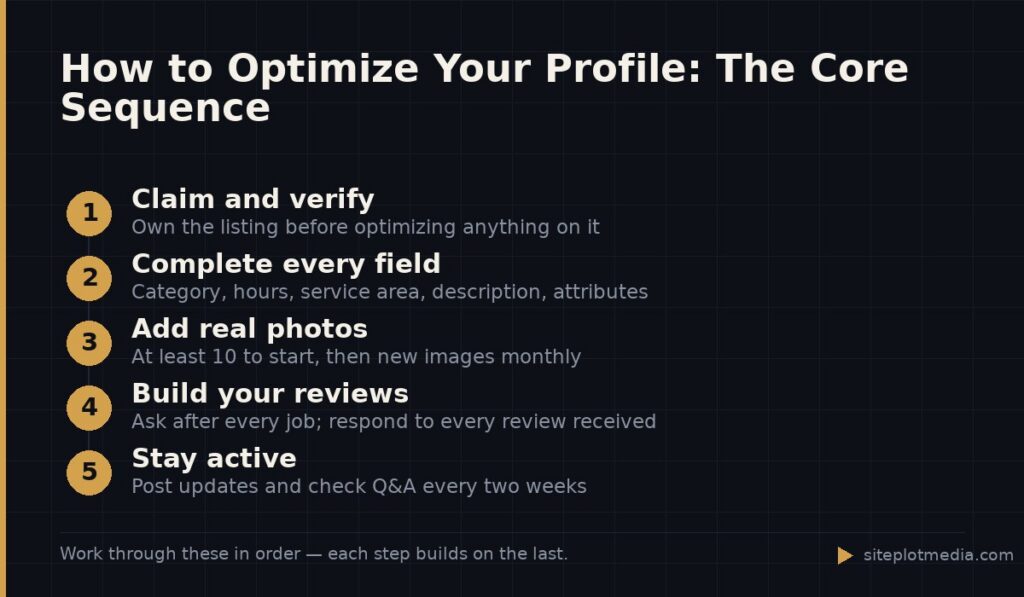
Before any optimization tactic matters, you need to own your listing. Go to business.google.com, search for your business name, and claim it if it already exists or create a new one. Google will ask you to verify ownership, usually by postcard, phone call, or video — this step is non-negotiable and takes a few days if you go the postcard route.
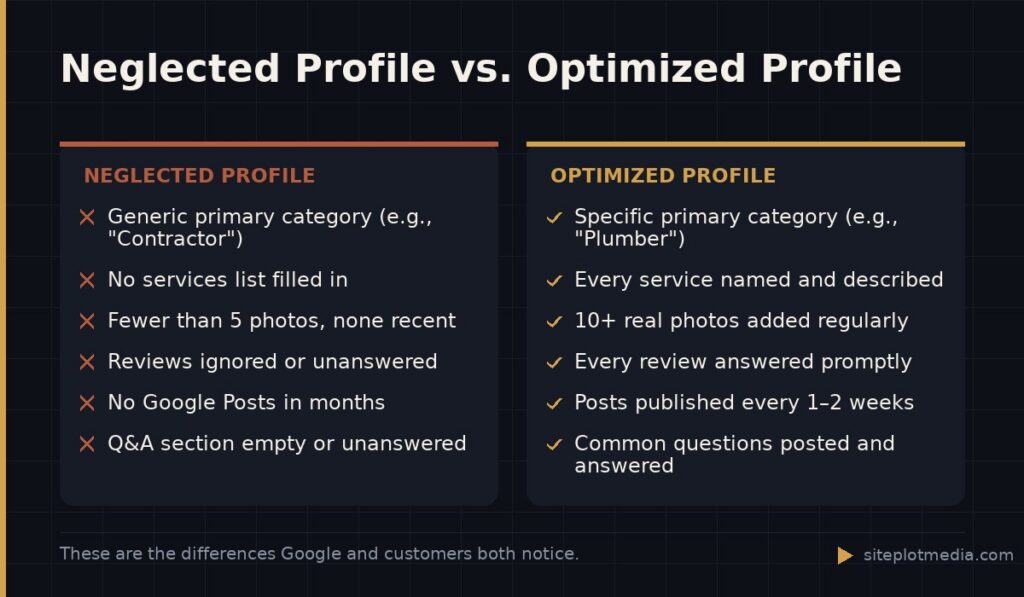
Once verified, treat the profile like a form you have to get to 100 percent. Every blank field is a missed opportunity. Fill in your legal business name exactly as it appears on your signage and other directories — inconsistencies across the web can quietly work against you. Set your primary business category as precisely as possible. “Plumber” outperforms “Contractor” for someone searching for a leaking pipe. Add secondary categories only if they genuinely describe what you do.
Fill in your phone number, website URL, and service area. For businesses that go to the customer — electricians, landscapers, house cleaners — use a service area instead of (or in addition to) a street address if you do not want your home address published publicly. Google allows you to list up to 20 service areas by city, county, or zip code.
Your services and description are selling tools, not formalities
The Services section is underused by most businesses and overvalued by almost none. Build it out deliberately. Add every service you actually offer, give each one a clear name, and write a one-to-two sentence description that speaks to what the customer gets — not just what you do. “Drain cleaning” becomes more useful when the description says “We clear slow or blocked drains same day for homes and small commercial buildings in the area.”
Your business description (found under the Info tab, limited to 750 characters) should explain what you do, who you serve, and what makes you worth calling. Write it in plain language. Do not keyword-stuff it — Google reads for relevance, but customers read for trust. Focus on what a first-time visitor needs to know in 30 seconds.
Also set your attributes. These are the small checkboxes that appear in your profile — things like “Women-led,” “Veteran-owned,” “On-site services,” or “Online estimates available.” They filter search results and help the right customers find you.
This is the kind of thing we handle day to day — you can see how our build process works or browse recent work.
Photos and updates tell Google your business is alive
Google favors profiles that show signs of active management. Photos are the most visible signal of this. Upload at least 10 real photos when you set up the profile: your team, your work (before and after if applicable), your vehicles or equipment, and any physical location. Use your phone — authenticity matters more than production quality here. Stock photos add nothing and may actually reduce trust.
Keep adding photos over time. A profile that received its last photo two years ago looks dormant. Even one or two new images per month is enough to maintain freshness. For service businesses, job photos are ideal because they show prospective customers what your finished work actually looks like.
Google Posts work like a lightweight social feed on your listing. Use them to announce seasonal services, promotions, completed projects, or simple reminders that you are taking new clients. Posts expire after seven days (Events can run longer), so publishing every one to two weeks keeps your listing current. It does not take much — two or three sentences and a photo is enough.
Reviews are the single biggest trust signal — manage them actively
Reviews affect both how often your profile appears and whether customers choose you over a competitor. The volume, recency, and rating of your reviews all matter. The most reliable way to get more reviews is simply to ask — in person at the end of a job, in a follow-up text, or in a brief email. Make it easy by sending a direct link to your review page (you can generate this inside your Business Profile dashboard).
Respond to every review, positive or negative. For five-star reviews, a brief, genuine thank-you is enough. For negative reviews, respond calmly and professionally — not defensively. A composed response to a critical review often does more to build trust with future customers than the negative review does to damage it. Never argue in public.
Do not buy reviews or offer discounts in exchange for them. Google detects and removes suspicious review patterns, and a sudden spike of reviews from accounts with no history can trigger a flag on your listing. Steady, real reviews earned over time are far more durable.
Questions, messaging, and the details most businesses skip
The Q&A section of your profile is public and editable by anyone — including strangers. Check it regularly and answer every question yourself before someone else does. You can also seed it proactively: think of the two or three questions customers ask most often before hiring you, then post and answer those questions yourself. This reduces friction for undecided prospects.
If you turn on Messaging, customers can send you a direct message from your listing. This can generate real leads, but only if you respond quickly — Google tracks your response time and will disable the feature if you consistently leave messages unanswered. Only enable it if someone on your team can realistically reply within a few hours during business days.
- Keep your hours accurate, including holiday hours. A customer who shows up and finds you closed will often leave a negative review.
- Add a booking link if you use an online scheduling tool — this removes a step between finding you and hiring you.
- Update your profile immediately if your phone number, address, or service area changes.
How Google Business Profile optimization fits into a broader local SEO strategy
Your Google Business Profile is not a standalone tool — it works alongside your website, your citations (listings on directories like Yelp, Angi, and the Better Business Bureau), and the content on your site. If your profile says you serve a 10-county region but your website has no pages or content about those areas, Google has less confidence in that claim. The profile and the site reinforce each other.
For local service businesses, this combination — a fully optimized profile, a fast and trustworthy website, and consistent directory listings — is what moves you into the Local Pack, the map results that appear near the top of Google when someone searches for a service near them. None of these elements alone is a guarantee of placement, but all of them together are the legitimate path to it.
If you want help building that foundation properly, Siteplot Media offers a full local SEO build that covers your website, profile setup, citation work, and content strategy — starting at $5,000 with ongoing support at $500 per month after a 90-day included period. That said, if your budget is tight, investing a few hours in your Google Business Profile yourself is genuinely worthwhile and will produce results even without professional help.
Frequently asked questions
How long does it take to see results from Google Business Profile optimization?
Most businesses see measurable improvements in profile views and calls within 30 to 90 days of making substantive updates. Results depend on your market's competition level, how complete your profile was before, and whether your website and citations support what your profile claims.
Do I need a physical storefront to have a Google Business Profile?
No — service-area businesses that operate from a home address or mobile location can create a profile and simply hide their street address while listing the cities or regions they serve. This is standard practice for contractors, cleaners, and other businesses that go to the customer.
What is the most important thing to get right on a Google Business Profile?
Your primary business category is arguably the most important single field because it tells Google what searches to show your listing for. Choose the most specific category that accurately describes your main service, and revisit it if your business focus changes.
Can I optimize my Google Business Profile myself, or do I need an agency?
You can absolutely do this yourself — Google's interface is straightforward and the fundamentals require no technical knowledge. An agency adds value when you want to combine profile work with website optimization, citation building, and content strategy at scale.
How many photos should a Google Business Profile have?
Start with at least 10 real photos covering your work, team, and equipment, then add new images at least once or twice a month. There is no upper limit, and profiles with more authentic, recent photos consistently appear more credible to both Google and prospective customers.