A service page ranks when it clearly answers what the service is, who it helps, and why your business is the right provider — all structured in a way search engines can read and users trust. The most common reason service pages fail to rank is that they describe the business instead of answering the customer’s question. Fix the content first, then make sure the technical basics (page title, headings, internal links) are in place.
Start with what your customer is actually searching for
Before you write a single word, you need to know the exact phrase a potential customer types into Google when they need what you offer. This is called keyword research, and it doesn’t require expensive tools. Type your service into Google and look at the autocomplete suggestions and the “People also ask” box. Those phrases are real searches from real people.
The goal is to find one primary phrase your page will target — for example, “commercial plumbing repair Atlanta” rather than just “plumbing.” Broader terms are dominated by large directories and national brands. A specific phrase tied to your service and location is where a small or mid-sized business can actually compete.
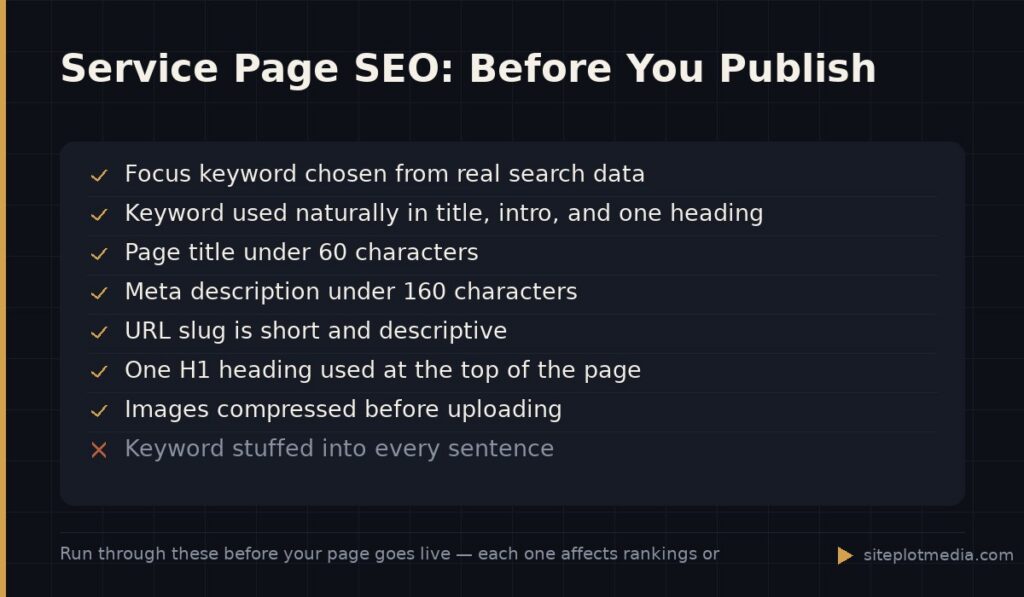
Once you have your phrase, use it naturally in the page title, the first paragraph, one or two subheadings, and the meta description (the short blurb that appears under your link in search results). Don’t stuff it in everywhere — if a sentence sounds awkward, rewrite it. Search engines are good at detecting the difference between natural writing and keyword cramming, and they penalize the latter.
Write for the customer first, and the search engine will follow
A well-ranking service page answers three questions immediately: What is this service? Who is it for? Why should I trust this company to do it? If a visitor has to scroll or click around to find those answers, they’ll leave — and a high bounce rate signals to Google that your page wasn’t useful.
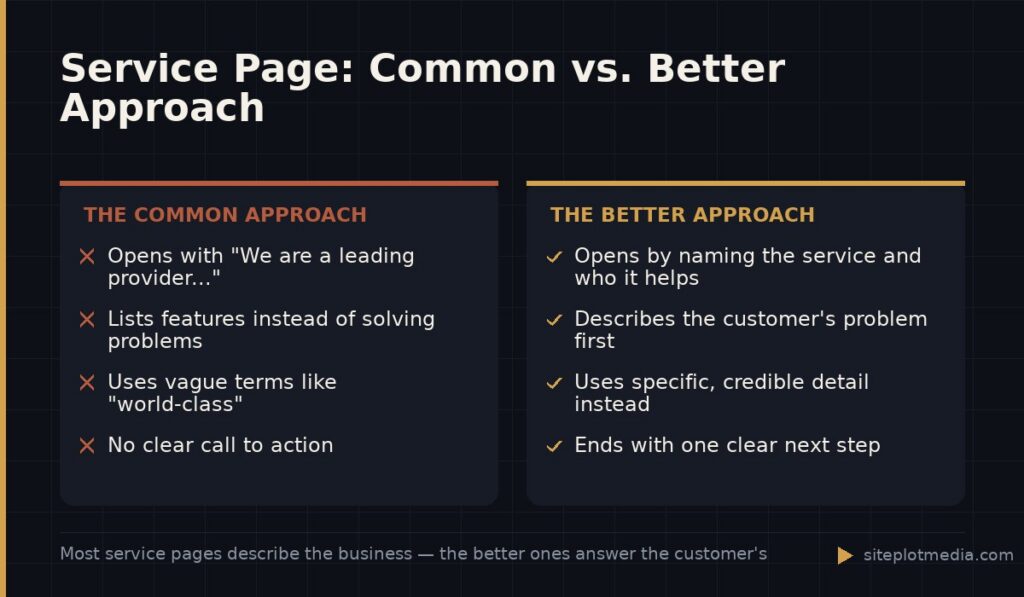
Open with a clear statement of what you do and who you help. Then explain the problem you solve in plain language — the symptom your customer feels, not the technical process you use. People search for relief from pain, not for process descriptions. “We help retail stores that are losing foot traffic because their Google Business Profile is incomplete” lands better than “We offer Google Business Profile optimization services.”
Use specific detail to demonstrate real expertise. Mention the kinds of clients you typically work with, the decisions you help them make, and what a realistic outcome looks like. Vague promises like “we deliver results” are invisible to readers and to search engines. Specific claims — even modest, honest ones — build the credibility that keeps people reading.
This is the kind of thing we handle day to day — you can see how our build process works or browse recent work.
Structure the page so both humans and search engines can scan it
Google doesn’t read your page the way a person does. It scans headings, links, and structure first to understand what the page is about. A wall of paragraphs with no headings is hard for both audiences. Break your page into logical sections with descriptive H2 and H3 headings that include relevant terms.
A solid structure for a service page looks like this:
- A headline that names the service and implies the benefit
- A short opening paragraph that answers the “what and who” question
- A section on the problem you solve
- A section on your specific approach or process
- Social proof — not invented testimonials, but real outcomes, client types, or credentials
- A clear call to action (contact form, phone number, or a next step)
Internal links matter too. Link from this service page to related pages on your site, and make sure other relevant pages link back to it. This tells search engines the page is important within your site, and it helps visitors explore naturally.
Demonstrate trustworthiness — Google calls it E-E-A-T
Google evaluates content using a framework sometimes called E-E-A-T: Experience, Expertise, Authoritativeness, and Trustworthiness. You don’t need to know the acronym, but you do need to understand what it means in practice: your page should show evidence that a real, qualified person or business produced it.
Practical ways to demonstrate this on a service page include naming the team members or roles involved in delivering the service, referencing how long you’ve been doing this kind of work, and linking to any licenses, certifications, or press mentions if they exist. If you’ve worked with specific industries, say so. If you have a process that’s genuinely different from competitors, describe it specifically — not as a marketing claim, but as a factual explanation of how you work.
Avoid inflated language. Phrases like “world-class,” “industry-leading,” or “cutting-edge” carry no information and are easy for both readers and AI systems to discount. One concrete sentence about your actual approach is worth more than a paragraph of superlatives.
The technical side: what needs to be correct before you publish
Content quality is the biggest factor in whether a service page ranks, but a few technical basics have to be in place or your content won’t get a fair shot.
- Page title tag: This is the blue link in search results. It should include your focus keyword and be under 60 characters so it doesn’t get cut off.
- Meta description: Not a direct ranking factor, but a well-written one improves click-through rates. Keep it under 160 characters and make it sound like a useful promise, not a summary.
- URL slug: Keep it short and descriptive. Use hyphens between words, not underscores. A URL like /commercial-plumbing-repair is better than /page?id=47.
- Page speed: A slow page loses visitors before they read anything. Compress images before uploading and avoid loading unnecessary scripts. This matters especially on mobile.
- One H1 heading per page: Your main headline should use the H1 tag. Everything else is H2 or H3. Most website builders handle this automatically, but it’s worth checking.
These aren’t advanced topics — they’re table stakes. If your site is built on a common platform like WordPress, most of them can be managed with a basic SEO plugin. If you’re not sure your site handles these correctly, an audit from a web development or SEO professional can identify gaps quickly.
How long will it take to see results?
Honest answer: it depends on how competitive your market is, how established your domain is, and whether you’re building new pages or improving existing ones. A brand-new page on a new domain in a competitive market can take six months or more to appear on the first page of results. A well-optimized page on an established domain in a less competitive niche can move noticeably within weeks.
What you can control is the quality of the work you put in now. Service pages that are genuinely useful, clearly structured, and technically sound tend to accumulate authority over time — they keep rising. Pages that are thin or vague tend to stall.
If you’re considering professional help, scope and investment vary widely. DIY with a good plugin and solid content is genuinely sufficient for some businesses. Agencies and freelancers typically charge anywhere from a few hundred dollars for a single-page audit to several thousand for a full build. Siteplot Media’s web and SEO packages, for reference, start at $5,000 one-time with $500 per month ongoing after an included 90-day period — but the right fit depends entirely on your goals and how competitive your market is.
Frequently asked questions
How long should a service page be for SEO?
A service page should be as long as it takes to fully answer the customer's question — typically 500 to 1,000 words for a focused service. Longer is not automatically better; a tight, specific 600-word page will outrank a padded 2,000-word page that repeats itself.
Should I have one service page or separate pages for each service?
Separate pages for each distinct service almost always perform better for SEO. Each page can target its own specific keyword, which gives you more chances to rank and makes it easier for search engines to understand exactly what you offer.
Do I need a blog to rank a service page?
No, a blog is not required to rank a service page. A well-optimized service page can rank on its own — a blog helps over time by building topic authority and attracting links, but it's not a prerequisite for getting your core service pages into search results.
Will AI search engines like ChatGPT or Google's AI Overviews show my service page?
AI search tools tend to surface content that answers questions directly, clearly, and in plain language — the same qualities that help you rank in traditional search. Writing your page with a direct opening answer and specific, credible detail is the best preparation for both.
Can I write the service page myself or do I need to hire someone?
You can absolutely write it yourself if you know your service and your customer well — in fact, your firsthand knowledge is an advantage. Hiring a professional makes sense when you're unsure about keyword targeting, technical structure, or if writing isn't a strength you want to spend time on.