
You can migrate a website without losing your Google rankings by planning your redirects carefully, replicating your existing on-page SEO signals on the new site, and monitoring performance closely for at least 90 days after launch. Migrations almost always cause a temporary dip in traffic — that is normal — but if you follow the right process, your rankings should recover and often improve within a few months. The businesses that lose rankings permanently are usually the ones that skip the pre-migration audit or forget to set up redirects before going live.
Why website migrations are risky for SEO in the first place
Google has spent months or years learning your current site — its URLs, its content, and which pages are worth ranking. When you migrate, you are essentially asking Google to relearn everything at once. If the new site has different URLs, missing content, or broken signals, Google may drop pages from its index temporarily or permanently.
The most common culprits are URL changes without proper redirects, content that got rewritten and lost its keyword relevance, and structural changes that bury pages deeper in the site. None of these are fatal on their own, but stacking several mistakes at once is how businesses end up losing rankings they spent years building.
The good news: migration risk is manageable. It just requires doing things in a specific order, not skipping steps under deadline pressure, and knowing what to watch after you flip the switch.
Before you touch a single file: the pre-migration audit
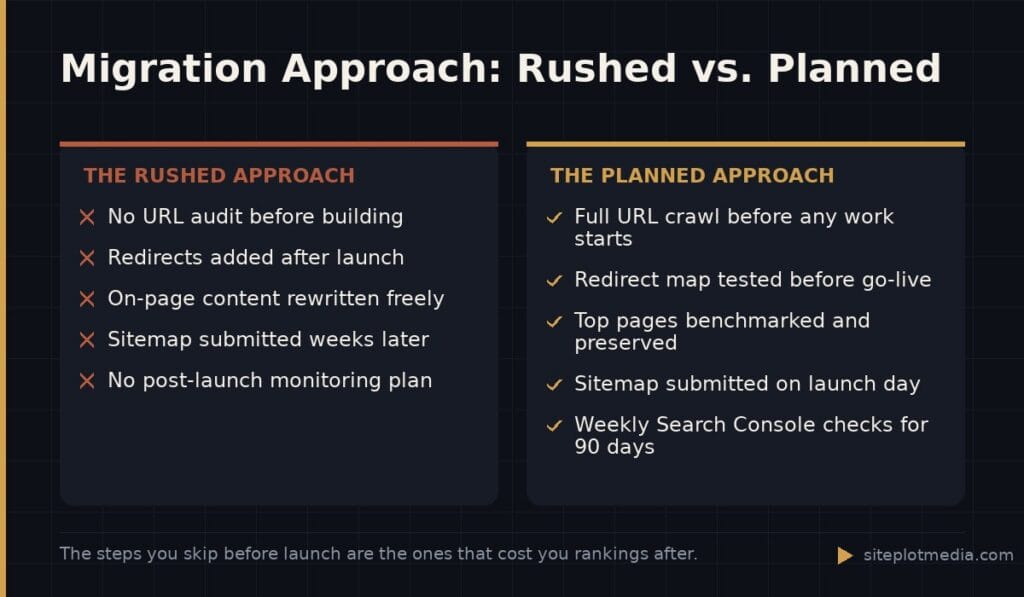
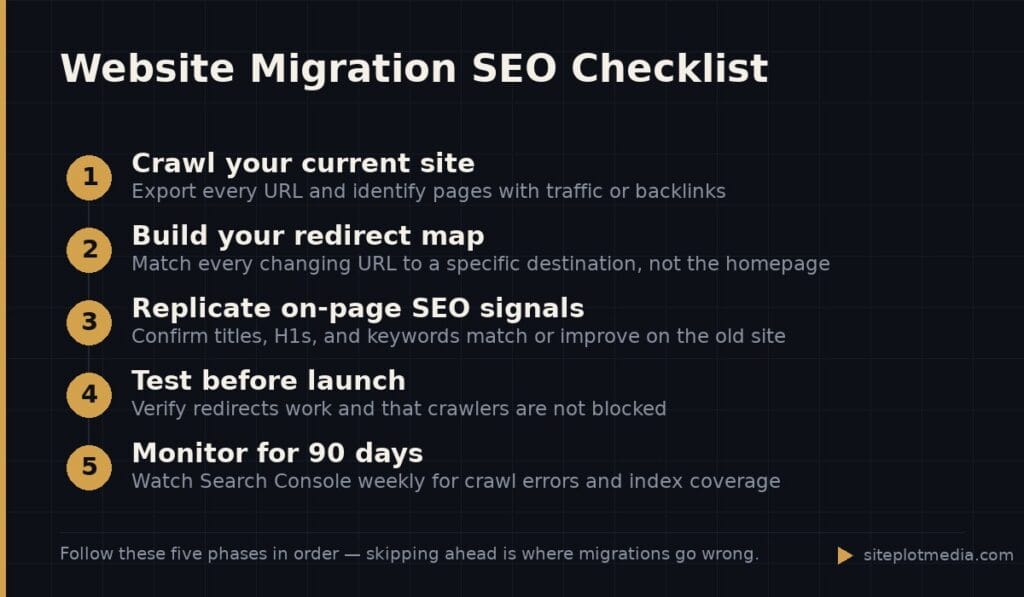
The most valuable work happens before the new site is built, not after. Start by crawling your current site with a tool like Screaming Frog or Ahrefs to document every URL that exists today. Export the full list. These are your assets — the pages Google has indexed and, in some cases, ranked.
Next, identify which pages actually drive traffic or have backlinks pointing to them. You can find this in Google Search Console under “Performance” and in any backlink tool under your domain. Pages with inbound links from other websites carry what SEO professionals call “link equity” — essentially a vote of credibility that Google factors into rankings. Those pages need to be preserved or redirected with extra care.
Finally, document the on-page SEO elements on your highest-performing pages: the page title, the meta description, the H1 heading, and the first paragraph of body copy. These are your benchmarks. The new site should match or improve on them — not accidentally overwrite them.
This is the kind of thing we handle day to day — you can see how our build process works or browse recent work.
The redirect map: the single most important deliverable
A redirect (specifically a 301 redirect) tells Google: “This page moved permanently. Please credit the new URL with everything you knew about the old one.” Without redirects, every URL that changes becomes a dead end, and any ranking or link equity attached to the old URL evaporates.
Your redirect map is a spreadsheet with two columns: the old URL and the new URL it should point to. Every old URL that is changing needs a row. If the new site consolidates two old pages into one, both old URLs redirect to the single new one. If a page is being removed entirely with no good equivalent, redirect it to the most relevant category or parent page — not the homepage. Sending everything to the homepage is a common shortcut that Google largely ignores.
- Map every old URL to a specific destination, not a catch-all
- Avoid redirect chains (old URL → intermediate URL → final URL) — go direct
- Test every redirect before launch using a browser extension or a tool like httpstatus.io
- Keep the old site’s redirect rules in place for at least 12 months after launch
Replicating your SEO signals on the new site
Redirects handle the URL changes, but they do not protect you if the new pages themselves are weaker than the old ones. If a developer or copywriter rewrote your best-performing service page and accidentally removed the keywords that made it rank, no redirect will fix that.
Before launch, compare the new versions of your top pages side by side with the old ones. Check that the primary keyword still appears in the page title, the H1, and the first 100 words of body copy. Check that the meta description is present and specific. Check that internal links — links from one page of your site to another — still exist and point to the right places. These signals collectively tell Google what a page is about and how it fits into your site’s structure.
Also confirm that your XML sitemap on the new site lists your important pages and that your robots.txt file is not accidentally blocking Google from crawling them. Both of these are small files, but they control whether Google can even see your new site at all. A staging environment that blocks crawlers is normal and correct — just make sure that block is removed when you go live.
What to monitor in the 90 days after launch
Expect a temporary dip. Google needs a few weeks to recrawl your new site, process the redirects, and re-evaluate your pages. A drop in clicks or impressions during the first two to four weeks is normal and does not mean something is wrong. What matters is the trend after that initial period.
Connect Google Search Console to your new domain immediately — before launch if you can. It takes a few days to start populating data, and you want it running the moment you go live. Set up Google Analytics as well so you have traffic data to compare. During the first 90 days, check weekly for:
- Crawl errors and 404 pages (broken URLs that were not redirected)
- Index coverage — are your important pages getting indexed?
- Impressions and clicks for your top keywords in Search Console
- Any spike in “page not found” errors in your server logs
If you see a specific page drop significantly after the first month, go back to basics: confirm its redirect is working, confirm its on-page content still targets the right keyword, and check whether any inbound links to that page are now hitting a dead end. Most post-migration ranking problems trace back to one of these three things.
When to hire help and what to expect it to cost
If your site has fewer than 50 pages, no significant backlinks, and you are mainly changing the design without changing URLs, you can likely manage a migration yourself using the steps above and Google’s own Search Console documentation. The risk is low and the recovery time if something goes wrong is short.
If your site has hundreds of pages, drives meaningful revenue, or involves a platform change — say, moving from WordPress to a new CMS, or changing your domain name — professional help is worth the investment. A botched migration on a site generating real leads can cost far more in lost business than the cost of getting it done right.
SEO migration services from agencies vary widely: lighter-touch audits and redirect mapping might run a few hundred to a couple thousand dollars, while full-service migrations with ongoing monitoring can range much higher depending on site size and complexity. For context, Siteplot Media’s website builds include migration planning, redirect setup, and 90 days of post-launch monitoring as part of a $5,000 one-time engagement, with continued SEO support available at $500 per month after that period. Whether that fits your situation depends on your site’s size and what is at stake — and if a simpler approach is right for you, we will say so.
Frequently asked questions
How long does it take to recover rankings after a website migration?
Most sites see rankings stabilize within four to twelve weeks after a properly executed migration. Sites with complex structures or significant URL changes may take longer, and a small permanent adjustment in either direction is possible — migration is also an opportunity to improve, not just preserve.
Do I need to tell Google about my migration?
You do not need to notify Google directly, but you should submit your new XML sitemap in Google Search Console as soon as the new site is live. If you changed domains entirely, Search Console has a “Change of Address” tool that helps Google process the move faster.
Will changing my domain name hurt my rankings?
A domain change carries more risk than a same-domain redesign because Google treats it as a more significant signal shift, but it is manageable with proper 301 redirects from every old URL to its new equivalent. Expect a longer stabilization period — sometimes three to six months — before rankings fully settle.
What is the most common SEO mistake during a website migration?
The most common mistake is launching the new site without a complete redirect map in place, which turns every changed URL into a dead end. A close second is copying the redirect file from staging but forgetting to remove the “noindex” tag that blocks search engines during development.
Can I migrate my website and redesign it at the same time?
Yes, but doing both at once increases risk because you are changing more variables simultaneously, making it harder to diagnose problems if rankings drop. If you can, keep URL structures the same during a redesign, or at minimum complete the redirect map before the new design goes live.