
Most small business WordPress sites benefit from a CDN, but it is not always required—whether you need one depends on where your visitors are located, how your site is hosted, and what kind of content you serve. If the majority of your traffic comes from one region and your hosting is already solid, you may see only a modest improvement. That said, a CDN is one of the cheaper, easier performance wins available, and for sites with images, video embeds, or visitors spread across multiple states or countries, it is almost always worth it.
What a CDN actually does (in plain language)
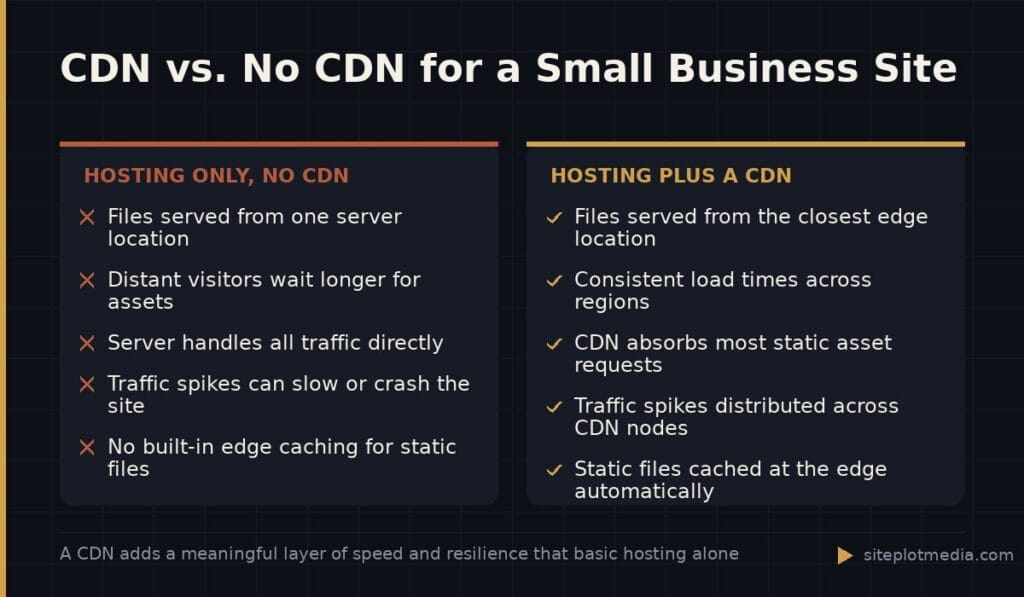
CDN stands for Content Delivery Network. When someone visits your website, your server has to send all of your files—images, stylesheets, scripts—to their browser. If your server is in, say, Dallas, and your visitor is in Boston, that round trip takes a little time. A CDN solves this by storing copies of your files on servers in many locations around the world and serving each visitor from the location closest to them.
Think of it like a warehouse network. Instead of shipping every order from one central warehouse, you pre-stock regional warehouses so deliveries arrive faster. For your website, the practical effect is that pages load more quickly for more people, regardless of where they are.
A CDN also absorbs traffic spikes and reduces the load on your main server. If a blog post goes unexpectedly viral, your CDN handles much of the surge without your server buckling under the demand.
When a CDN makes a real difference for a small business site
A CDN has the most impact in these situations:
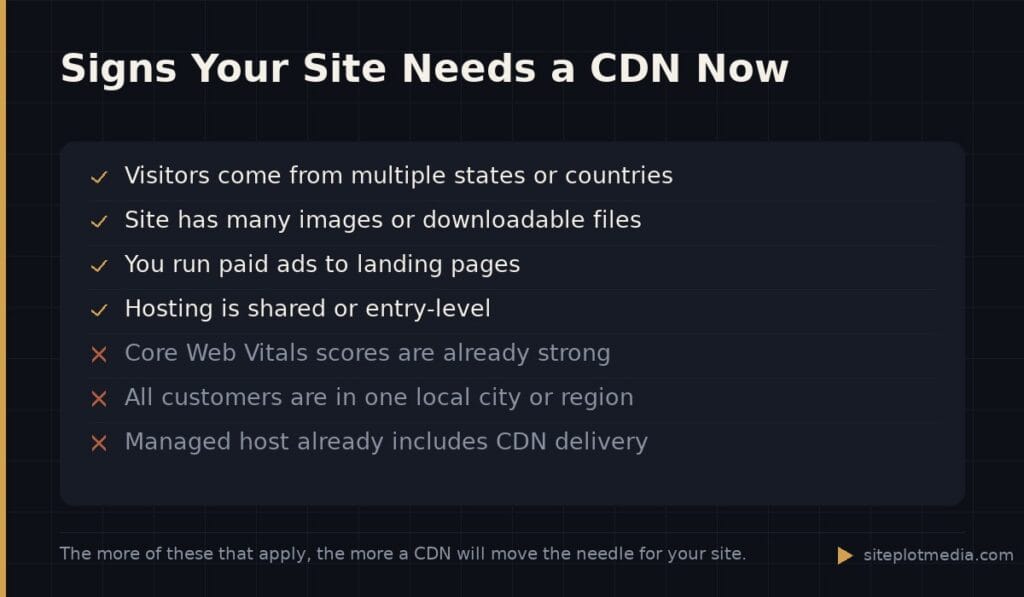
- Your visitors are spread across multiple states or countries, not concentrated in one metro area.
- Your site is image-heavy—a portfolio, product gallery, restaurant menu with photos, or any page with several large visuals.
- You embed video or serve downloadable files like PDFs or brochures.
- Your hosting plan is shared or entry-level, meaning your server resources are limited to begin with.
- You are running Google Ads or any paid campaign where landing page speed directly affects your Quality Score and cost per click.
In any of these scenarios, a CDN can meaningfully reduce how long it takes for your page to feel ready to use—what developers call Time to First Contentful Paint. Faster-feeling pages tend to hold visitors longer and convert better, even if the raw time saved is measured in fractions of a second.
This is the kind of thing we handle day to day — you can see how our build process works or browse recent work.
When you can probably skip it—or hold off
Honesty requires saying this clearly: not every small business site needs a CDN right now. If all of the following are true for you, a CDN is likely a low-priority item:
- Nearly all of your visitors come from one city or region.
- Your site is mostly text with a handful of small images.
- You are already on a quality managed WordPress host like Kinsta, WP Engine, or Cloudways, many of which include CDN functionality in their plans.
- Your Google PageSpeed scores are already in a healthy range and you are not running paid ads.
In that situation, the smarter investment is usually fixing whatever is actually slowing your site down—unoptimized images, render-blocking scripts, a bloated page builder, or a poorly configured caching plugin. A CDN layered on top of underlying performance problems will help some, but it will not fix the root issues.
Which CDN options are worth considering for WordPress
For most small businesses, you do not need an enterprise solution. The three most practical starting points are:
- Cloudflare (free tier): The most widely used option for small business WordPress sites. The free plan includes CDN functionality, basic DDoS protection, and automatic caching. It takes about 20 minutes to set up by pointing your domain’s nameservers to Cloudflare. For many sites, this is all you will ever need.
- Your host’s built-in CDN: If you are on a managed WordPress host, check your dashboard before adding anything. Many include CDN delivery as part of the plan, sometimes powered by Cloudflare or Fastly under the hood.
- Bunny.net or KeyCDN: Low-cost pay-as-you-go CDNs that are easy to integrate with WordPress via a plugin. Pricing is usage-based and very affordable for typical small business traffic volumes.
Avoid over-engineering this. Cloudflare’s free plan is genuinely capable. If your site is not serving millions of visits a month, you do not need a premium enterprise CDN plan that costs hundreds of dollars a month.
How a CDN fits into the bigger picture of WordPress performance
A CDN is one layer of a performance stack, not a standalone solution. A well-performing WordPress site generally needs all of the following working together: quality hosting, a caching plugin configured correctly, properly sized and compressed images, minimal unused JavaScript and CSS, and then a CDN on top to deliver those optimized assets quickly.
If you are building or rebuilding a WordPress site with performance in mind from the start, it is worth having someone plan the full stack rather than bolting on fixes one at a time. At Siteplot Media, our site builds start at $5,000 one-time with $500 per month after a 90-day included period, and performance architecture—including CDN setup—is part of that work, not an afterthought.
If your site already exists and you just want to know whether a CDN alone will help: it will help some, and if you use Cloudflare’s free tier it costs you only the time to set it up. But if your Core Web Vitals scores are poor, treat the CDN as one item on a longer checklist, not the whole answer.
Frequently asked questions
Does a CDN help with Google SEO rankings?
A CDN can indirectly support SEO by improving page speed, which is a confirmed ranking signal through Google's Core Web Vitals. It does not directly boost rankings on its own, but faster load times can improve your scores on metrics like Largest Contentful Paint, which Google does factor in.
Is Cloudflare free CDN good enough for a small business WordPress site?
Yes, Cloudflare's free plan is sufficient for the vast majority of small business WordPress sites. It includes genuine CDN delivery, caching, and basic security features without requiring any payment.
Will adding a CDN break my WordPress site?
A CDN set up correctly will not break your site, but misconfigured caching rules can cause issues like showing visitors outdated content after you make updates. Using a plugin like Cloudflare's official WordPress plugin or your host's integration reduces this risk considerably.
Do I need a CDN if I only have local customers?
If all of your customers are in a single city or region and your hosting server is located in that same region, a CDN will have a smaller impact on speed. It is still not harmful, but other performance improvements—image optimization, caching, cleaner code—will likely matter more.
Does managed WordPress hosting replace the need for a CDN?
Many managed WordPress hosts include CDN functionality built into their plans, so you may already have it without knowing. Check your hosting dashboard or documentation before setting up a separate CDN service to avoid duplicating effort.