
WordPress maintenance typically costs between $50 and $500 per month for small and mid-sized businesses, depending on how complex your site is and what services are included. Basic plans cover updates and backups; more comprehensive plans add security monitoring, performance optimization, and priority support. If a plan seems unusually cheap, it’s worth asking exactly what gets done — and how often.
What drives the price of WordPress maintenance?
WordPress maintenance isn’t one thing — it’s a bundle of ongoing tasks, and the price reflects which tasks are included, how frequently they’re done, and who’s doing them. A solo freelancer handling five client sites in their spare time will price very differently than a studio with dedicated systems and staff available during business hours.
The main factors that affect monthly cost include:
- Site complexity — A simple brochure site needs far less attention than an e-commerce store processing daily transactions or a membership site with custom integrations.
- Update frequency — WordPress core, themes, and plugins release updates constantly. Some providers update weekly; others monthly. Frequency matters because outdated plugins are the most common entry point for hacks.
- Backup strategy — Daily off-site backups with tested restores are meaningfully more work than weekly on-server backups that nobody checks.
- Response time guarantees — Plans that promise a response within hours cost more than those where you submit a ticket and wait.
- Included labor — Some plans include a set number of “developer hours” for small edits and fixes. Others are strictly maintenance, and any change request is billed separately.
Understanding which of these matter most for your business will help you evaluate any quote you receive — and avoid paying for things you don’t need.
What do different price tiers actually include?
The market has settled into a few recognizable tiers, and each comes with real trade-offs.
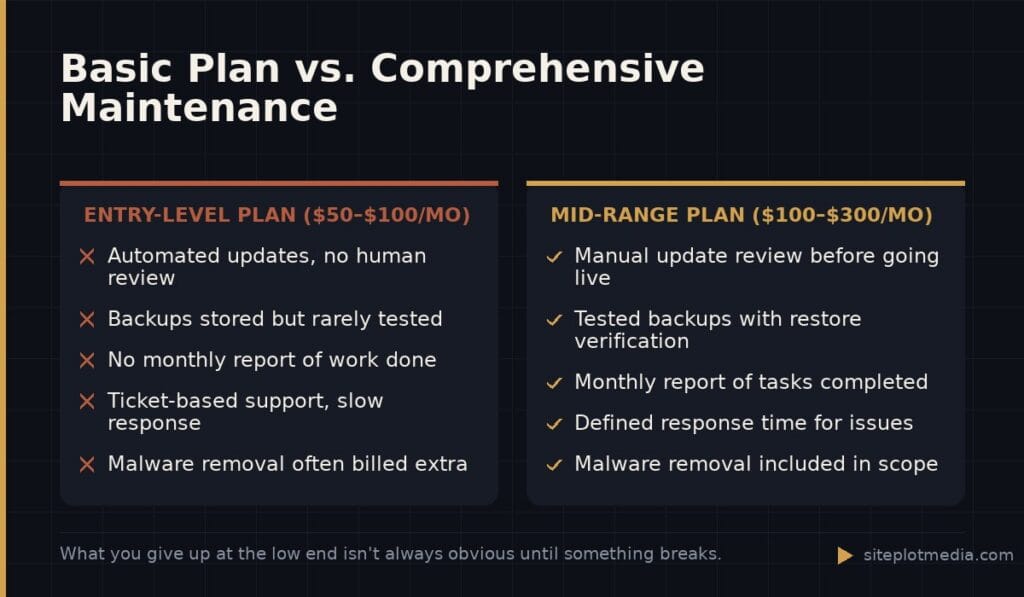
$50–$100/month (entry-level): You’ll typically get automated plugin and core updates, basic uptime monitoring, and periodic backups. These plans work for very simple sites — a five-page local business site that doesn’t generate revenue directly. The risk is that “automated updates” without human review can break things, and there’s often no one watching when they do.
$100–$300/month (mid-range): This is where most small businesses should be looking. Plans at this level usually add manual update review, security scanning, malware removal if something goes wrong, and at least some access to a human for support questions. Some include a monthly report so you can see what was actually done.
$300–$500+/month (comprehensive): At this level, you’re typically getting a dedicated point of contact, performance monitoring, regular technical SEO checks (such as crawl error reviews and Core Web Vitals audits), and a meaningful block of included development time. This tier makes sense for sites where downtime or a slow page directly costs you money — e-commerce, lead generation, online bookings.
Above $500/month, you’re usually looking at agency retainers that go well beyond maintenance into ongoing strategy and development work. That’s a different product than “keeping the site healthy.”
This is the kind of thing we handle day to day — you can see how our build process works or browse recent work.
When the cheaper option is genuinely fine
Honest answer: not every business needs a comprehensive maintenance plan. If your website is essentially a digital business card — you’re a local service provider, your clients find you by referral, and the site exists to confirm you’re legitimate — a basic $50–$100/month plan that keeps things updated and backed up may be completely appropriate.
The test is this: if your website went down for 24 hours, what would it cost you in real revenue or real leads? If the answer is “not much,” you don’t need to spend $300/month protecting it. If the answer is “a lot,” that’s when investing in a higher tier of care is defensible.
Also consider your internal capacity. If you have a developer on staff who can handle updates and troubleshooting, you may only need a lightweight plan that covers what they don’t want to manage — backups, monitoring, security scanning. There’s no shame in being honest about what you actually need.
Red flags to watch for in maintenance plans
Not all maintenance plans deliver what they promise. A few patterns that should give you pause:
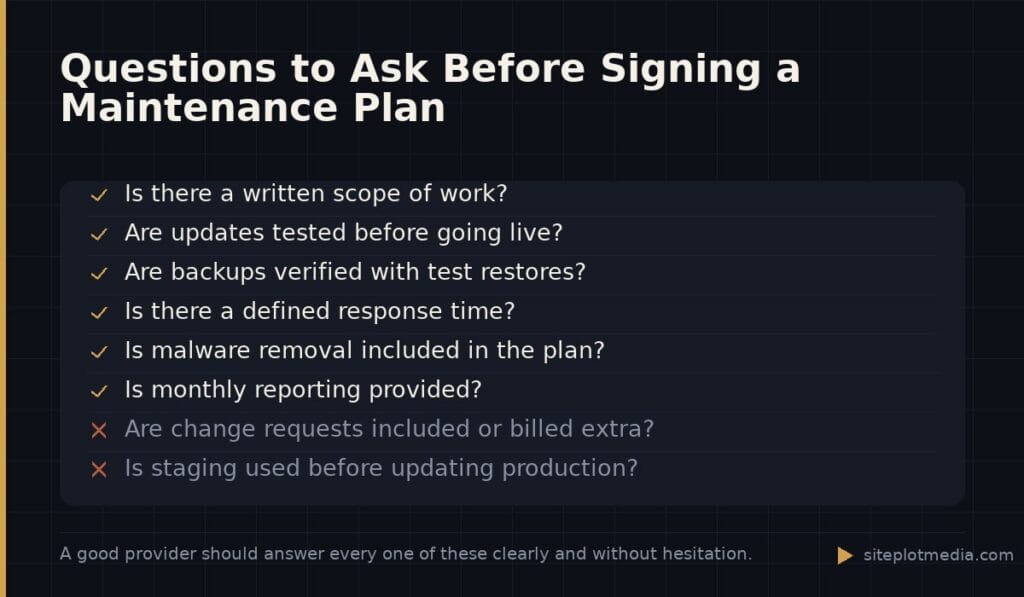
- No monthly reporting — If a provider can’t show you what they did each month, there’s no way to know if anything was done at all. A simple log of updates applied, backups confirmed, and issues addressed is a basic expectation.
- “Unlimited updates” with no human review — Applying every plugin update automatically without checking compatibility first is how sites break. Ask whether someone reviews updates before they go live, especially on production sites.
- Malware removal billed separately — Some plans advertise security monitoring but charge extra when you actually get hacked. That’s worth clarifying upfront.
- No clear response time commitment — “We’ll get to it” is not a support policy. Know what you’re getting before something goes wrong.
- Vague scope — If the plan description is three bullet points and nothing more, ask for a written scope of work before you sign anything.
Asking these questions before you sign isn’t being difficult — it’s exactly what a thoughtful business owner should do. Any reputable provider will welcome the specificity.
How Siteplot Media structures ongoing care
For context on how one studio approaches this: Siteplot Media builds WordPress sites for a flat project fee of $5,000, which includes 90 days of maintenance at no additional cost. After that period, ongoing care is $500/month — a rate that reflects manual update review, security monitoring, tested backups, performance checks, and direct access to the team that built the site.
That price is higher than entry-level plans and lower than full agency retainers, and it’s structured that way deliberately. The 90-day included period exists because the first three months after a launch are when most issues surface, and we want to be hands-on during that window without clients feeling like they’re on the clock. After that, the monthly fee covers a real scope of ongoing work — not a checkbox of automated tasks.
Whether that’s the right fit for your situation depends on your site’s complexity and how much your business depends on it. We’d rather tell you that upfront than oversell a plan you don’t need.
How to evaluate any maintenance quote you receive
When you’re comparing proposals, the price is almost the last thing to evaluate. Start with scope: exactly what tasks are performed, how often, and by whom? Then move to accountability: what does the monthly report look like, and what’s the process when something goes wrong?
Ask specifically about update testing — do they test on a staging environment before pushing to your live site? Ask about backup verification — are restores tested periodically, or do they just assume the backup worked? Ask about response time — if your site goes down at 9 a.m. on a Tuesday, what happens?
Once you have clear answers to those questions, the price will make a lot more sense. A $150/month plan with solid answers to every question is often a better investment than a $75/month plan that’s vague on all of them. What you’re really buying is the confidence that someone competent is watching your site — and that they’ll be reachable when you need them.
Frequently asked questions
Is $50/month enough for WordPress maintenance?
$50/month can be enough for a simple site where downtime has minimal business impact, but it typically only covers automated updates and basic backups — not human review or meaningful support. If your site drives leads or revenue, budget higher.
What's the difference between WordPress hosting and WordPress maintenance?
Hosting keeps your site running on a server; maintenance keeps the software on that site secure, updated, and functional. Most hosts don't apply plugin updates, review security logs, or restore a hacked site — that's what a maintenance plan covers.
Can I do WordPress maintenance myself to save money?
Yes, and for technically comfortable business owners it's a reasonable choice for simple sites. The main risks are missing a critical update, not having a tested backup when something breaks, and not catching a security issue early — all of which can cost more to fix than a monthly plan would have.
How often should WordPress plugins and themes be updated?
Most maintenance providers update plugins and themes at least monthly; security-related updates should be applied within a few days of release. Letting updates accumulate for months is the most common reason WordPress sites get compromised.
Does a maintenance plan cover fixing things that break on my site?
It depends on the plan — some include a set number of developer hours for fixes, while others cover only the maintenance tasks themselves and bill separately for any repair work. Always clarify this before signing, especially if your site uses complex plugins or custom code.