Page builder sites are slow because they load large amounts of code, styles, and scripts that your page doesn’t actually need — all to support visual drag-and-drop editing tools that run in the background whether a visitor uses them or not. Builders like Elementor, Divi, and WPBakery generate heavy, generic markup instead of lean, purpose-built code, and each plugin or widget you add stacks more weight on top. The result is a site that works fine in the editor but feels sluggish to real visitors, especially on mobile connections.
What a page builder is actually doing behind the scenes
A page builder is software that lets you arrange a website visually, without writing code. That convenience comes with a cost: the builder has to work for every possible layout a user might choose, so it loads a massive library of styles and scripts upfront, just in case. Think of it like bringing a full hardware store to hang a single picture frame.
When a visitor lands on your page, their browser has to download all that extra code before it can show them anything useful. Some builders add dozens of separate files — CSS stylesheets, JavaScript libraries, font packages — even on pages that use only two or three simple elements. Each file is a round-trip request to a server, and each request adds time.
The specific reasons page builder sites carry extra weight
There are a few distinct problems at play, and they compound each other:
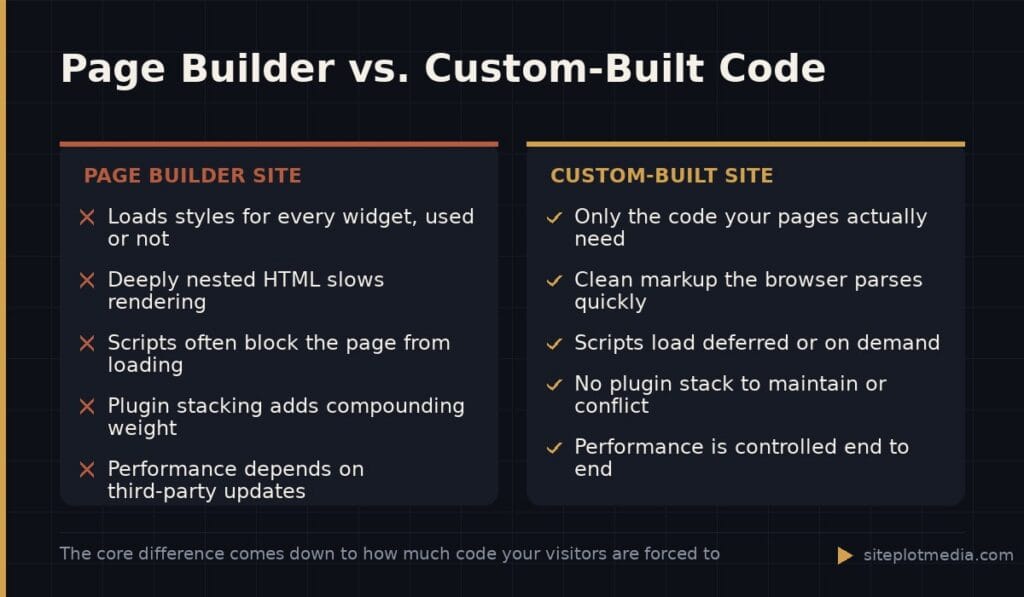
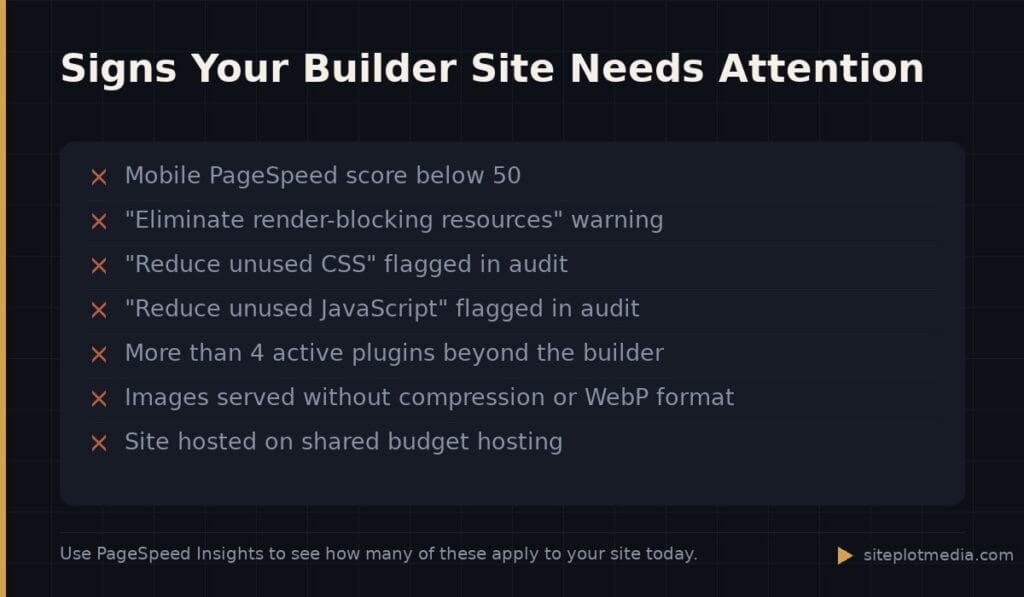
- Unused CSS and JavaScript. Builders generate styles for every widget they offer, not just the ones on your page. A visitor loading your contact page still downloads button styles, pricing table scripts, and accordion code they will never see.
- Deeply nested HTML. Visual editors wrap content in extra layers of divs and containers to make drag-and-drop work. More markup means more for the browser to parse before it can render anything.
- Plugin stacking. Most builder-based sites add a form plugin, a popup plugin, a slider plugin, a cache plugin to try to fix the slowness — each one adding its own scripts and styles.
- Render-blocking resources. Many builder scripts load early and force the browser to pause page rendering until they finish, which directly delays what users see.
- Image handling left to the user. Builders rarely enforce image compression or modern formats like WebP automatically, so unoptimized photos get uploaded and served at full size.
None of these problems are impossible to work around, but fixing them usually requires developer-level intervention — at which point the “easy” promise of a builder starts to erode.
This is the kind of thing we handle day to day — you can see how our build process works or browse recent work.
Why page speed matters more than it used to
Google uses a set of metrics called Core Web Vitals to measure how fast and stable a page feels to a real user. These metrics directly influence where your site ranks in search results. A slow page is not just an annoyance — it is a competitive disadvantage. Visitors who wait more than a couple of seconds for a page to load leave at much higher rates, and those lost visits represent real lost revenue.
Mobile visitors are hit hardest. A visitor on a mid-range phone with average cell service is downloading your bloated builder output on a slow pipe. What loads in two seconds on your broadband office connection might take six or eight seconds on their device. For many businesses, mobile traffic makes up the majority of visits, so this is not a fringe concern.
To be fair, a well-maintained builder site with aggressive caching, a quality host, and a developer who has trimmed unused assets can perform respectably. But that level of optimization takes real effort and ongoing attention — and still often falls short of what a purpose-built site can achieve with the same effort.
When a page builder site is probably fine
It would be dishonest to say all page builder sites are hopeless. For some businesses, a builder-based site makes complete sense:
- You are launching a side project or testing a new idea and speed to market matters more than peak performance right now.
- Your audience is primarily desktop users on fast connections.
- You are not relying on organic search traffic — you drive visitors through paid ads or direct outreach, and conversion rate is more important to you than search ranking.
- You have an internal team that actively maintains the site and knows how to keep the plugin stack lean.
The honest question is not “are page builders bad?” but “what does this site need to do, and is a builder good enough for that job?” If organic search and mobile performance are central to your growth strategy, the builder’s ceiling tends to be lower than you need.
What a custom-built site does differently
A custom-built site starts from a specific goal — your pages, your features, your content — and writes only the code those things require. There is no unused widget library sitting in the background. Styles apply only to elements that exist. Scripts load only when they are genuinely needed, and often defer so they do not block the page from appearing.
The result is leaner markup, faster load times, and better scores on the metrics Google measures. It also tends to age better: a custom site is not dependent on a third-party builder’s update schedule or the compatibility conflicts that come with stacking plugins.
The trade-off is cost and flexibility. Making visual changes to a custom site typically requires a developer, whereas a builder lets a non-technical team member move things around without help. That flexibility has real value for some businesses. For others — especially those whose site is a stable marketing tool rather than a frequently redesigned storefront — the custom approach pays for itself in performance and lower long-term maintenance headaches. Siteplot Media’s custom build package starts at $5,000 one-time with a $500/month retainer after a 90-day included period, which reflects that custom work takes more upfront planning and craftsmanship than installing a theme.
How to diagnose your current site before making any decisions
Before you invest in anything, measure what you actually have. Google’s PageSpeed Insights tool (free, at pagespeed.web.dev) will show you a score for both mobile and desktop, and more importantly, it will tell you specifically what is slowing your site down. Look for items labeled “eliminate render-blocking resources,” “reduce unused CSS,” or “reduce unused JavaScript” — these are the fingerprints of builder bloat.
If your mobile score is below 50, your site is meaningfully slower than your competitors’ sites that score in the 70s and 80s. If it is between 50 and 70, targeted optimization may close the gap without a full rebuild. If it is already above 75, your builder site may be well-managed enough that a rebuild is hard to justify on performance grounds alone — and any good developer should tell you that honestly.
Frequently asked questions
Does Elementor slow down your website?
Yes, Elementor adds meaningful CSS and JavaScript weight to every page it builds, which can slow load times — especially on mobile. The impact varies depending on your hosting, theme, and how many additional plugins are installed alongside it.
Can you speed up a page builder site without rebuilding it?
You can improve performance through caching plugins, a faster host, image compression, and disabling unused builder modules, but there is a ceiling to how fast a builder site can get without removing the builder itself. Whether that ceiling is good enough depends on your specific performance goals.
Will a slow website hurt my Google rankings?
Yes, Google uses Core Web Vitals — real-world speed and stability metrics — as a ranking factor, and a slow site is at a disadvantage compared to faster competitors in the same search results. Speed alone will not determine your ranking, but it is one of many signals Google weighs.
Is a custom website always faster than a page builder site?
A well-built custom site is almost always faster than a builder site of equivalent complexity, because it carries only the code it actually needs. That said, a poorly built custom site or one on bad hosting can still be slow — quality of execution matters as much as the approach.
How do I check if my page builder site is slow?
Run your URL through Google PageSpeed Insights (pagespeed.web.dev) for a free, detailed breakdown of your mobile and desktop scores and the specific issues dragging them down. Focus on the mobile score first, since that reflects how most visitors experience your site.